If you're evaluating trial presentation software, you've probably come across both TrialPad and OnCue. Both platforms help legal professionals present evidence in the courtroom, and both have loyal user bases. But the differences between them — in philosophy, design, cost, and overall capability — are significant, and understanding those differences can save you time, money, and stress when it matters most.
This comparison is designed to help attorneys, paralegals, litigation support professionals, and trial technicians make an informed decision based on what each platform actually delivers.
Starting With What They Share
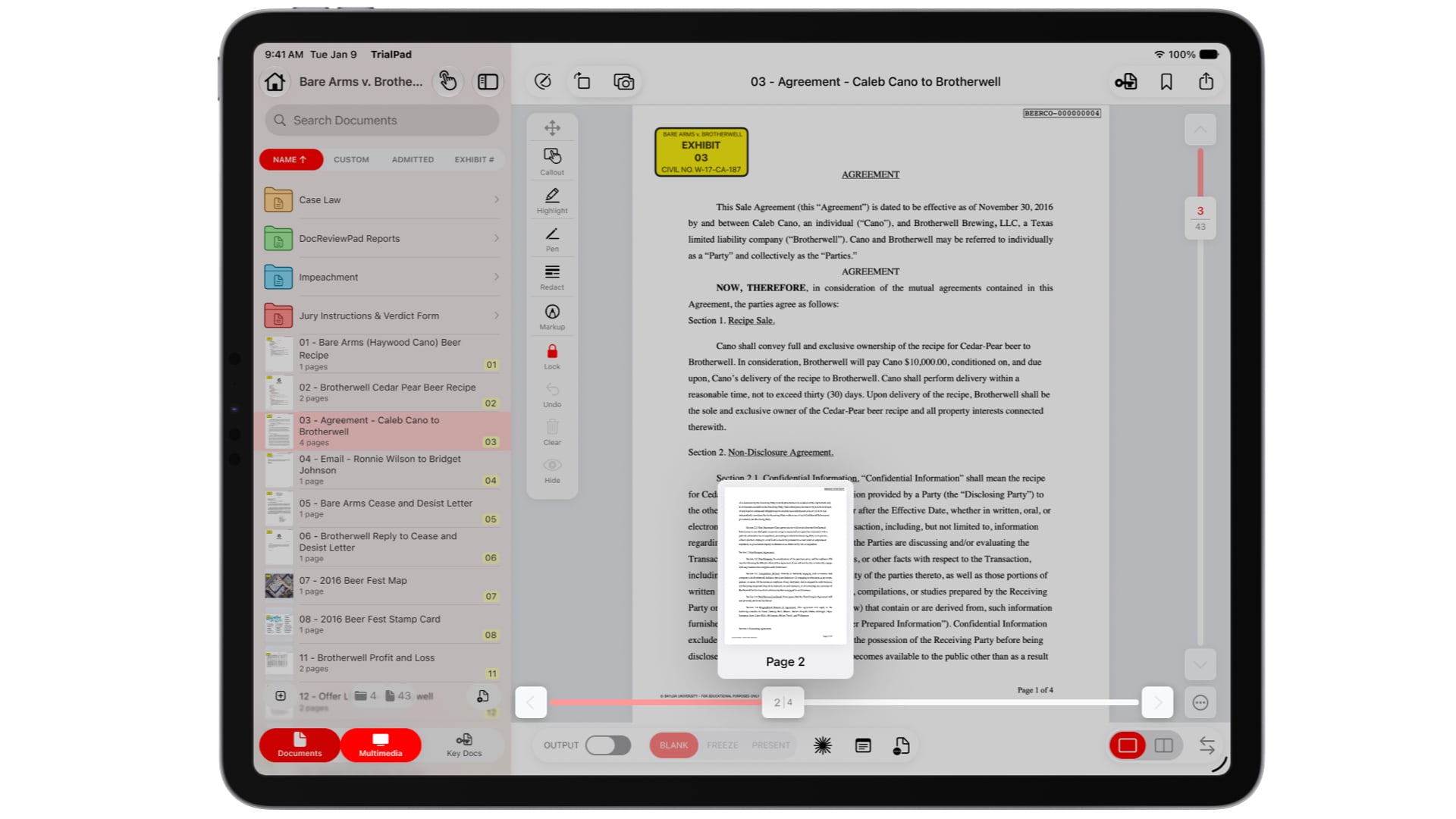
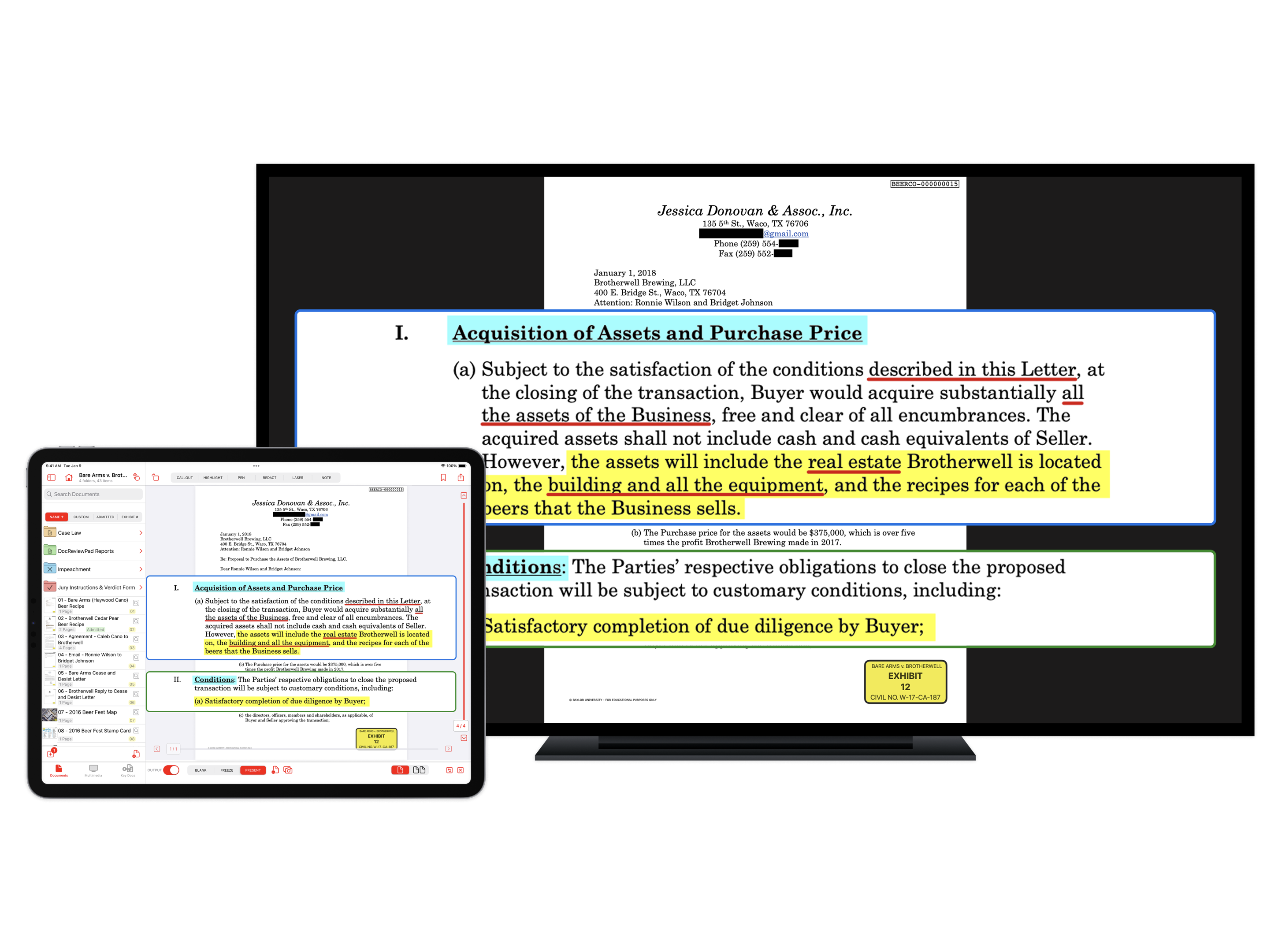
Both TrialPad and OnCue cover the core fundamentals of courtroom presentation. With either platform, you can import and organize documents, create callouts and highlights on exhibits, play video depositions, present to external monitors or projectors, and manage exhibit lists. Both are used in real courtrooms, in real trials, every day.
But courtroom presentation is only part of the equation. How you prepare for trial, how portable your setup is, how much you spend, and how steep the learning curve is — these are the factors that separate a good tool from the right tool.
Feature Comparison
TrialPad v. OnCue: What's Included
| TrialPad (LIT SUITE) | OnCue | |
| Platform | iPad, Mac, and iPhone | Windows only |
| Portability | Full courtroom setup fits in a bag | Requires a Windows laptop, external monitors, cabling, and often additional AV equipment |
| Learning Curve | Designed for attorneys to use themselves | Built for dedicated trial technicians; steep learning curve |
| Video Deposition Sync | Included at no extra cost via TranscriptPad's on-device syncing | Requires ProSync — starts at $15/hr on-demand, or pre-purchased credits |
| Transcript Review | Full-featured TranscriptPad app included in subscription | Not included — OnCue focuses of presentation only |
| Document Review | DocReviewPad included for annotation, Bates stamping, and production | Not included |
| Timeline Creation | TimelinePad included for interactive chronologies | Not included |
| Electronic Exhibit Binders | ExhibitsPad included — distribute evidence to jurors on iPads | Not included |
| Wireless Presentation | Built-in via Apple TV or HDMI | Not available — requires physical monitor connections and AV hardware |
| Offline Capability | Fully offline — no cloud or internet connection needed | Runs locally on Windows |
| Apple Pencil/Markup Support | Yes — handwrite directly on exhibits in real time | No |
| Pricing (Annual) | $600/year for the entire LIT SUITE (5 apps); as low as $500/yr Enterprise | $900/year (Pro plan) for OnCue alone — plus additional costs for ProSync syncing |
| Free Trial | 7-day free trial via the App Store | Evaluation license available upon request |
Who Each Platform Is Built For
This is where the most important distinction lies.
OnCue is built for trial technicians. Also known as "hot-seaters," these are specialists who set up Windows laptops, external monitors, video switchers, and other AV equipment in the courtroom. They operate the software while the attorney focuses on advocacy. OnCue gives these professionals granular control over layouts, multiple display outputs, and complex video editing workflows. If you're a trial tech who runs courtroom presentations full-time, OnCue is a capable tool for that specific workflow.
TrialPad is built for the people who actually try cases. It was designed from the ground up so that attorneys, paralegals, and litigation support staff can organize, prepare, and present evidence themselves — without needing a dedicated technician and without needing weeks of training. The interface is intuitive. The hardware requirements are minimal. And the entire LIT SUITE ecosystem means you're not just getting a presentation tool — you're getting a complete litigation workflow.
This distinction matters because hiring a trial technician can cost $1,500 to $2,000 per day or more. For a two-week trial, that's an additional $15,000 to $20,000 in costs — before you even account for equipment rental and setup time. For many cases, that expense simply isn't justified, and attorneys who can present their own evidence effectively gain a strategic advantage: they know the case better than any outside technician ever will, and they can react in real time without relying on someone else to find and display the right document.
Trial Techs Use TrialPad Too
It's worth noting that TrialPad isn't only for self-presenting attorneys. Many trial technicians and litigation support professionals use TrialPad and the LIT SUITE as their primary tools — and they do so by choice.
Professional trial presenters appreciate TrialPad's portability and reliability. There's no need to haul heavy equipment cases into a courthouse, no concerns about legacy VGA connections or courtroom infrastructure limitations, and no anxiety about whether a Windows update will disrupt your setup the morning of trial. An iPad, an HDMI adapter (or Apple TV), and TrialPad is a complete courtroom presentation system.
Trial techs also rely heavily on TranscriptPad to sync video depositions with transcripts — a task that would otherwise require expensive third-party syncing services. TranscriptPad handles syncing on-device at no additional charge, which represents significant savings across a case with dozens of depositions. By comparison, OnCue's ProSync feature charges between $5 and $15 per video hour depending on volume, and those costs add up quickly on large cases.
The LIT SUITE: A Complete Litigation Ecosystem
One of TrialPad's most significant advantages isn't just TrialPad itself — it's what comes with it. A single LIT SUITE subscription gives you access to five integrated apps, each designed for a specific phase of litigation:
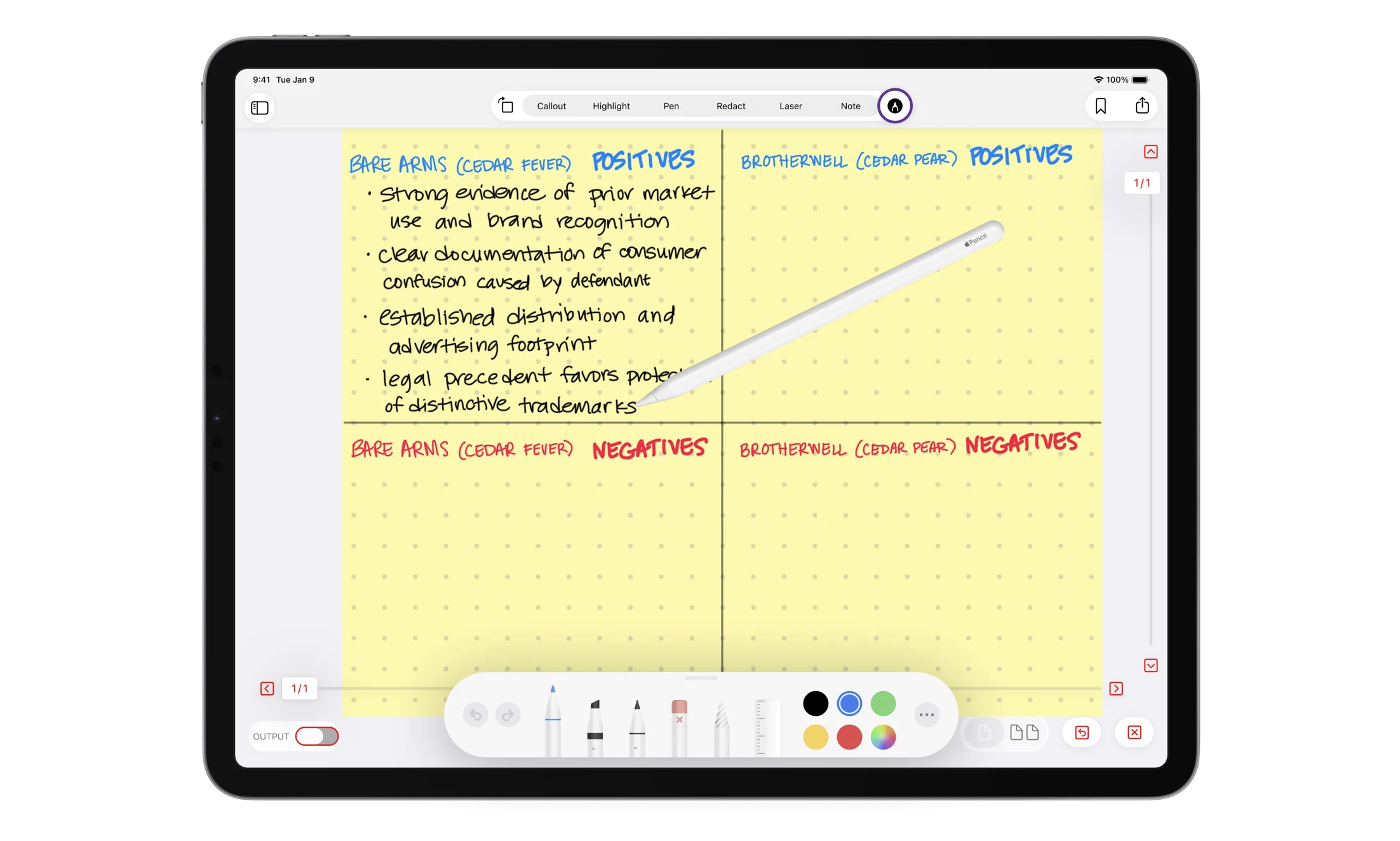
TrialPad is your courtroom presentation engine. Organize evidence into witness or issue folders, add custom exhibit stickers that auto-increment, create callouts and highlights on the fly, compare documents side by side, play and edit video and audio clips, and present wirelessly or via HDMI. The new Whiteboard and Markup tools let you sketch diagrams or annotate exhibits with Apple Pencil in real time — something no Windows-based competitor can match.
TranscriptPad transforms how you work with deposition transcripts. Search across all transcripts in a case simultaneously, create designations with issue codes, sync video depositions on-device at no extra cost, generate impeachment slides formatted for instant use in TrialPad, and create detailed summary reports in PDF, TXT, or Excel formats. For attorneys who review transcripts regularly, TranscriptPad alone justifies the subscription.
DocReviewPad handles document review, annotation, Bates stamping, and production. It provides a streamlined workflow for reviewing and organizing documents, and it can send relevant documents directly to TrialPad organized by issue code — creating a seamless pipeline from review to presentation.
TimelinePad lets you build interactive, presentable case timelines. Import events from Excel spreadsheets, link people and issues to events, add icons and color coding, and present your chronology as an interactive slideshow. It replaces the need to hire a graphic designer to create trial timelines — saving hundreds of dollars per timeline and giving you the ability to edit on the fly.
ExhibitsPad is a free electronic exhibit binder that replaces paper binder distribution entirely. Load evidence onto iPads and hand them to jurors, judges, witnesses, or mediators. With password protection and Apple's Guided Access feature, you can lock each iPad so the user can only view the exhibits — no internet browsing, no independent research, no tampering. This app was created during the COVID-19 pandemic to solve the problem of hygienically distributing evidence, and it has since become an invaluable tool for any proceeding.
OnCue, by contrast, is a single application focused on courtroom presentation. It doesn't include transcript review, document review, timeline creation, or exhibit distribution tools. To replicate what the LIT SUITE offers, you'd need to purchase and learn multiple separate products.
Pricing: The Full Picture
On the surface, both platforms are subscription-based. But the total cost of ownership tells a very different story.
TrialPad (LIT SUITE): $600 per year through the App Store, or as low as $500 per year through the Enterprise licensing program — and that includes all five apps (TrialPad, TranscriptPad, DocReviewPad, TimelinePad, and ExhibitsPad) on iPad and Mac. Video deposition syncing is included at no additional cost through TranscriptPad. Enterprise customers also get priority support, free quarterly training sessions, flexible payment options, and license management tools.
OnCue: $900 per year for the Pro plan (paid annually), or $100 per month on the Flex plan. The Team plan requires a minimum of 12 licenses at $700 per year each. ProSync deposition syncing costs extra — $15 per video hour on-demand, dropping to $5 per hour only if you pre-purchase 300 or more credits. Pro subscribers get one free ProSync job per month, but firms with significant deposition volumes will see those costs climb quickly.
When you factor in that TrialPad gives you five apps for $600 while OnCue gives you one app for $900 (plus syncing fees), the value proposition becomes clear. And that's before considering hardware: TrialPad runs on an iPad you may already own, while OnCue requires a Windows laptop and potentially additional AV equipment.
Portability and Courtroom Setup
Anyone who has tried cases in different courthouses knows that courtroom infrastructure varies wildly. Some courtrooms have modern HDMI connections and flat-panel displays. Others still rely on aging VGA projectors, limited power outlets, and cramped counsel tables.
TrialPad thrives in this reality. An iPad weighs about a pound. Connect via a simple HDMI adapter, or go wireless with Apple TV. There's no boot-up time, no Windows updates to navigate, and no complex AV configuration. You can set up and be ready to present in minutes.
OnCue requires a Windows PC — and OnCue's system requirements can be demanding. Several users in the trial technology community have noted that OnCue's predecessor, TrialDirector, required high-end hardware to run smoothly, and that OnCue, while lighter, still runs best on capable machines. Factor in external monitors, video cables, adapters for legacy courtroom connections, and the physical logistics of transporting and setting up that equipment, and the overhead adds up. For trial techs who do this every day, that's manageable. For attorneys or smaller firms, it's a significant burden.
The Bias You Should Know About
If you spend time in trial technology forums and LinkedIn groups, you'll notice a pattern: many of the loudest voices recommending OnCue over TrialPad are trial technicians — professionals whose livelihood depends on attorneys hiring them to operate complex presentation software in the courtroom.
This isn't to diminish the skill or value that experienced trial techs bring to high-stakes litigation. A great trial technician is worth every dollar on a complex, multi-week trial with thousands of exhibits and dozens of video depositions. But it's important to recognize that when a trial tech says things like TrialPad is "only for small cases," those comments are shaped by a business model that benefits from attorneys believing they can't present evidence themselves.
The reality is that TrialPad is used every day in cases of all sizes — from straightforward contract disputes to complex multi-party litigation — by solo practitioners, AmLaw 100 firms, government agencies, and in-house legal departments. Companies like Union Pacific, Jackson Lewis, Hogan Lovells, and Bradley trust the LIT SUITE for their litigation needs. The County of Maui uses it. Mercury Insurance uses it. These are not "small case" users.
When OnCue Might Be the Right Choice
To be fair, there are scenarios where OnCue makes sense. If your firm employs dedicated, full-time trial technicians who are already trained on the platform, if your cases consistently require the kind of multi-monitor, multi-source AV control that OnCue's interface is designed for, and if your budget accommodates both the software costs and the personnel costs of a trial tech — then OnCue is a solid tool in that specific context.
But for the vast majority of legal professionals — attorneys who want to present their own evidence effectively, litigation support teams looking for an affordable and complete workflow, trial techs who value portability and simplicity, and firms that want to reduce costs without sacrificing capability — TrialPad and the LIT SUITE are the better choice.
Conclusion
Both TrialPad and OnCue can get evidence on a screen in a courtroom. But the similarities largely end there.
TrialPad gives you a complete litigation ecosystem — five integrated apps covering presentation, transcript review, document review, timelines, and exhibit distribution — for less than what OnCue charges for its single presentation application. It runs on hardware you can carry in one hand. It's intuitive enough for an attorney to master in an afternoon and powerful enough for professional trial presenters to rely on daily. And it includes video deposition syncing at no extra cost, a feature OnCue charges separately for.
For legal professionals who want control over their evidence, their budget, and their courtroom presence, the LIT SUITE with TrialPad is the clear choice.
Ready to see the difference for yourself? Start your free 7-day trial of the LIT SUITE today, or contact the LIT SOFTWARE team to learn about Enterprise licensing for your firm or organization.