There's a particular feeling that comes from knowing you have everything (every document, every exhibit, every note) on the device already in your hand. No thumb drive to hunt for, no server to VPN into, no second app to open. That's the idea DocReviewPad was built on, and it's the idea behind everything in this release.
None of this is bolted onto a heavier system. It's the same tap-and-go DocReviewPad you already know, doing more of what it has always been for: helping you understand what's in a case, deciding why each piece matters, and getting it Bates stamped, issue-coded, and produced, or ready for a motion, a hearing, or trial.
Read on below for the full breakdown of everything that's new! And join us for our live webinar. Our team will walk through the changes and take your questions in real time.
⏰ October 29, 2026, 13:00 Eastern Time
👉Register now to save your seat: https://us02web.zoom.us/webinar/register/WN_jTJcOMkyS8moh4D44EgH7Q
Video is now part of the case
Bodycam footage. Dashcam. CCTV. A deposition recording. A clip your client shot on their phone. Video is evidence, but until now it lived somewhere else, reviewed in a separate app and a separate pass, disconnected from the issue coding and production workflow the rest of your case runs on. Not anymore.
- Import and play video right alongside your documents. MP4 and MOV files come in through the same Import menu and New Files inbox you already use, and sit in the document list with a frame thumbnail so you can spot the clip you need at a glance. A new built-in player handles playback, scrubbing, and speed.
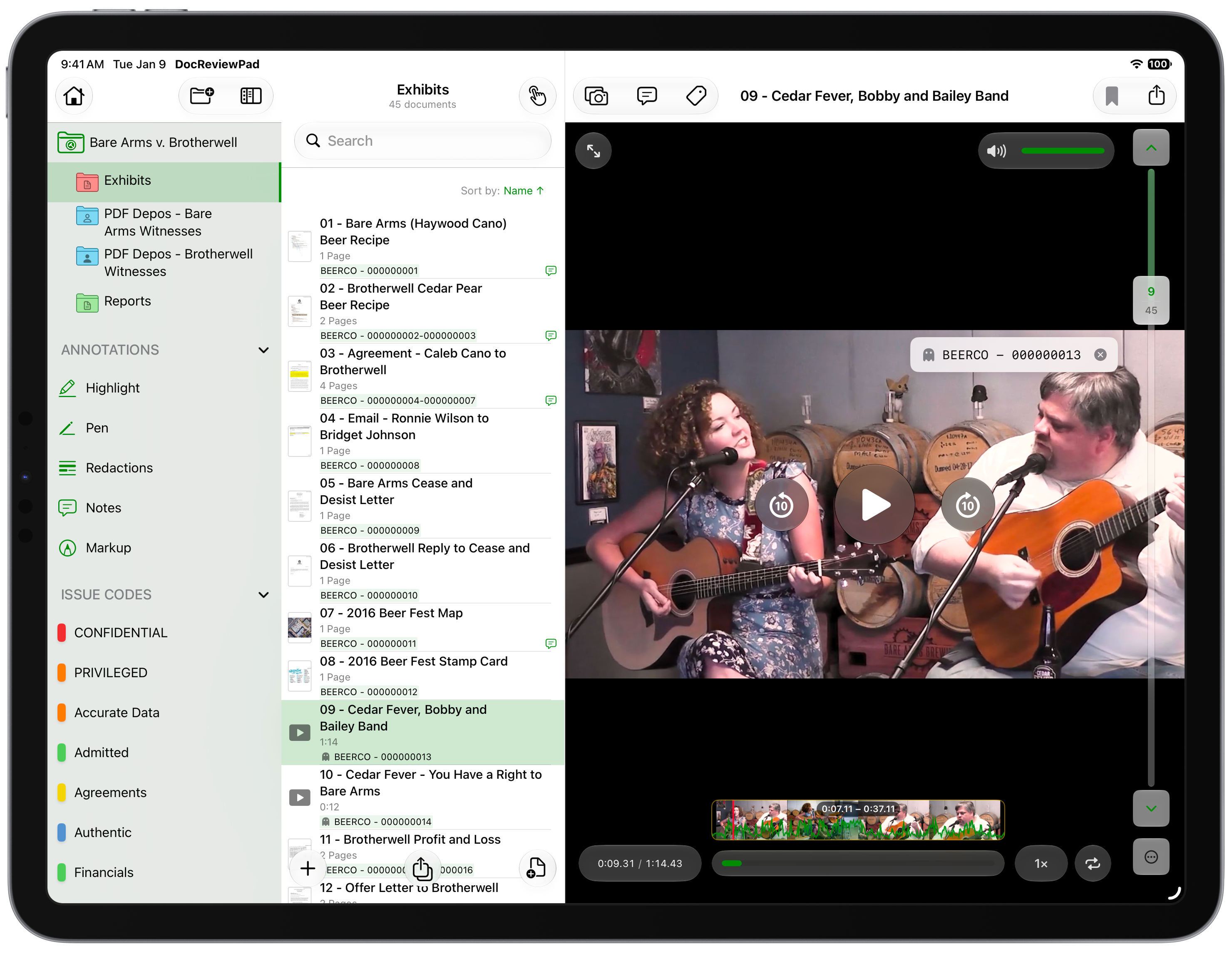
- Bookmark the moment, not just the file. Drop a bookmark from inside the player, rename it, and tap it later to jump straight back to that timecode. Mark the three key admissions in a two-hour deposition video once, and go right to each one when you build your outline.
- Capture Frame turns a still into a document. Pause on the frame that shows the vehicle in the intersection, tap Capture Frame, and it becomes a new document in the same folder, titled with the video name and timecode. Annotate it, Bates stamp it, and produce it as a still exhibit.
- Video gets the same treatment as every document. Give it a Bates number, issue code it, and add a note with timecodes you tap to jump to that moment. The Bates number appears as a Ghost Bates overlay on the player and is never burned into the video file.
- Export takes the video with it. A case or folder export writes out the original MP4 or MOV, copied exactly as imported rather than re-rendered, and lists it in the export report with its Bates number. To send a single clip, use Share Video right in the player.
Use it when: video is central to your case and you need to isolate the seconds that matter, code them to the issue they prove, and send them to TrialPad for the hearing or trial, without the footage ever leaving the case file it belongs in.
Search that actually keeps up with you
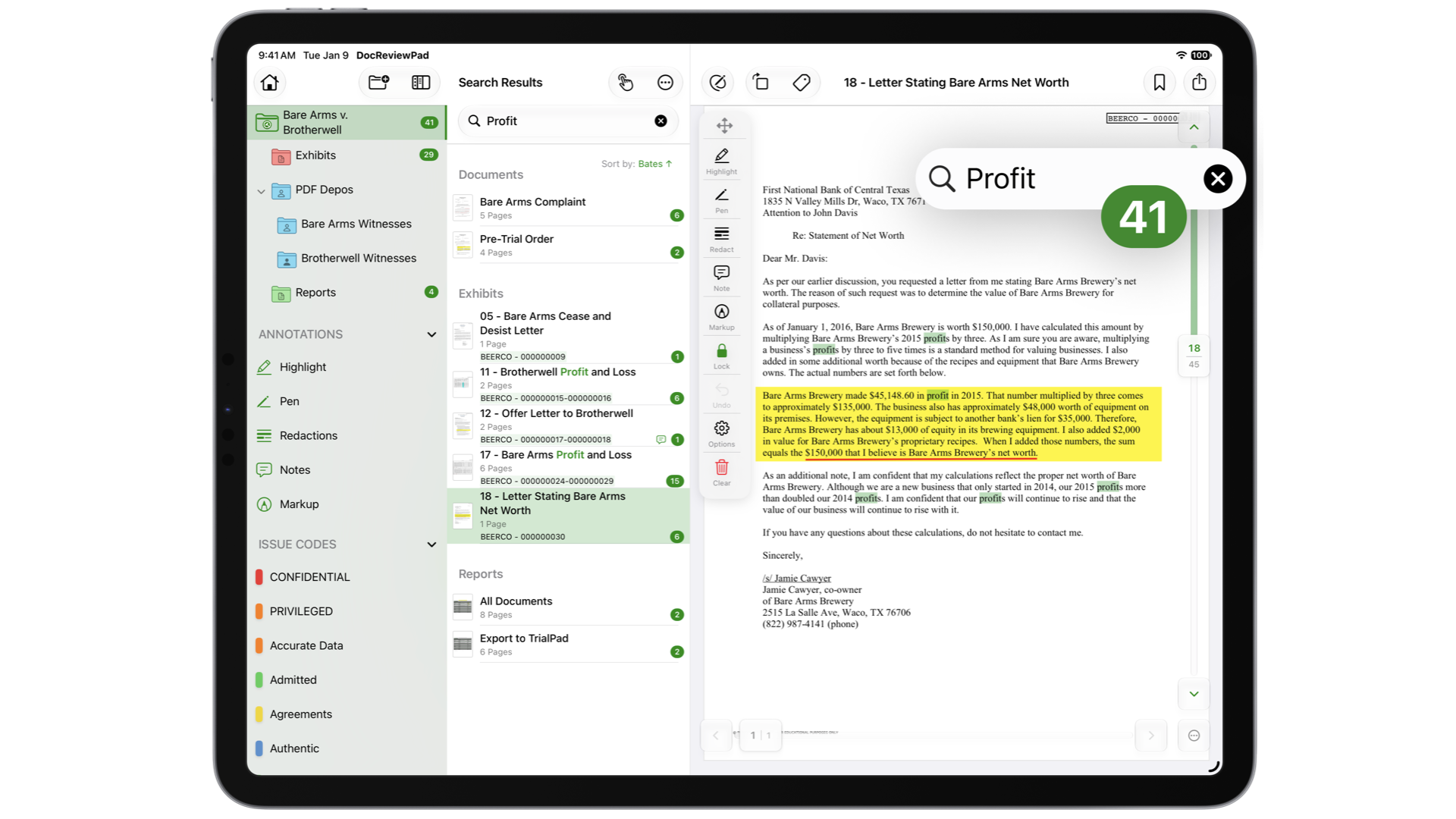
This is the update most likely to change how you work day to day. DocReviewPad now builds a case-wide search index in the background as documents come in, automatically running OCR on scanned and image-only pages. No separate OCR step, no waiting, and a very fast search, similar to what you have experienced in TranscriptPad for years. This is all on device and saved to your Case File. Now you can quickly search everything in your case, no matter where you are, or what device is in your hand.
Type a search term and filter by review status, annotation, or Bates number; or re-run a recent search. Press Return to search the text of every page. Results match all your words in any order, are grouped by document with the matching pages underneath, and open with matches highlighted, even on scans. Hit counts roll up from pages to documents to folders, so you can see at a glance where a search result actually sits. And because the index is saved with the case, reopening it doesn't mean re-indexing it.
.png?width=800&height=612&name=DCR%20Grouped%20Search%20Results(1).png)
Use it when: you need a name found across a 2,000-page production in seconds, including the pages that came in as scans.
Bates numbering, rebuilt
Bates numbering touches nearly every document you handle, so it got a top-to-bottom rework.
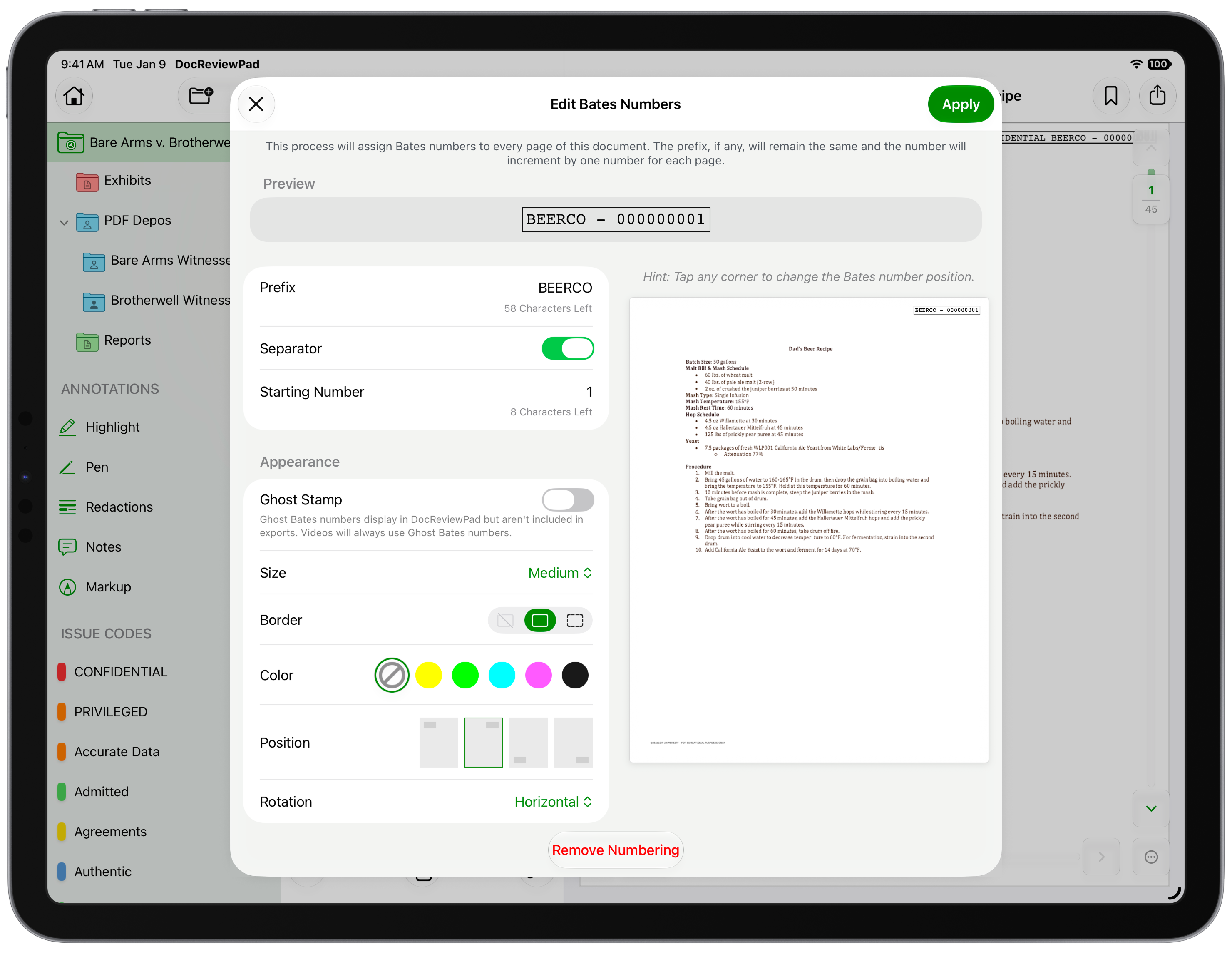
- A live preview. The Assign Bates window now shows the actual document next to the format and appearance controls, so you see exactly how and where the stamp will land before you commit.
- Tap to position. Tap any corner or edge of the preview, with a finger or Apple Pencil, or pick from all eight standard positions. Prefix, format, color, size, and border are yours to set, and DocReviewPad warns you before a new number breaks an existing sequence.
- Ghost Bates numbers. Assign real, sequential numbers without stamping anything on the page, for incoming productions that already carry another party's stamp. Ghost numbers appear in the document list, reports, and export file names, with the same duplicate protection as regular Bates numbers. Video always uses Ghost Bates.
- Ranges read cleanly. A range shows its prefix once (BEERCO-000001 – 000012) for a cleaner review at a glance.
- Big batches stamp in the background. The Assign Bates window closes right away and a progress bar tracks the work while you keep reviewing.
Use it when: you need the stamp in the exact right corner at the exact right size on the first try, or you need to organize an opposing party's production by your own numbering without adding a second mark to their pages.
A workspace that fits whatever you're holding
Your Case File now opens in three columns: a sidebar with your folders, annotations, and Tags & Issue Codes; the document list; and the document itself. Pick a folder, or tap an annotation type or issue code in the sidebar to see every document that carries it. When you want more room for the page, switch from Full Workspace to List & Document or Document Only.
And for the first time, DocReviewPad runs on iPhone. Open the same Case Files you built on your iPad or Mac, and the layout becomes a single stack: sidebar, list, document. Issue Codes slide up in a sheet while the page stays in view. On the iPhone Duo, unfold the phone and the case unfolds with it: list and document, or document and issue codes, sit on either side of the fold, and your open document and page stay put when you fold it closed.
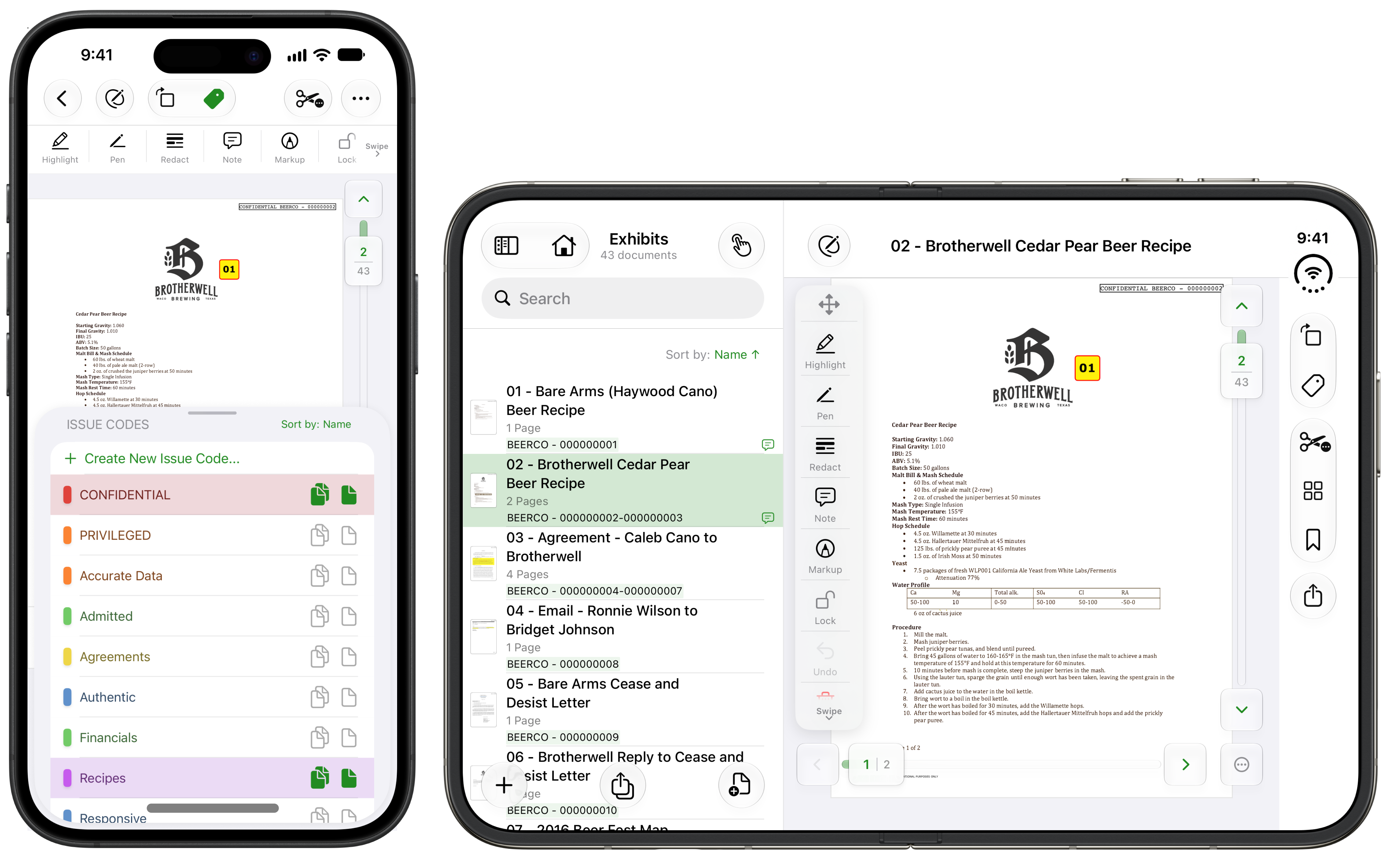
Use it when: you're reviewing a production on your iPad in the morning, and checking the same case on your phone in the courthouse hallway that afternoon.
Your review notes, ready to present
The work you do in review transfers seamlessly when it's time to present.
- Notes become Presenter Notes. Export to TrialPad and the Notes you added in DocReviewPad arrive as TrialPad Presenter Notes. The reasoning you captured while reviewing is right there, beside the exhibit, when you're on your feet.
- Timestamped bookmarks come with links. Bookmarks you set at moments in a video arrive in TrialPad as Presenter Notes with linked timestamps. Tap a timestamp and you're at that moment, ready to play it.
- Video travels with the set. Your video, with its Bates number and notes, goes along with the rest of the production when you export to TrialPad.
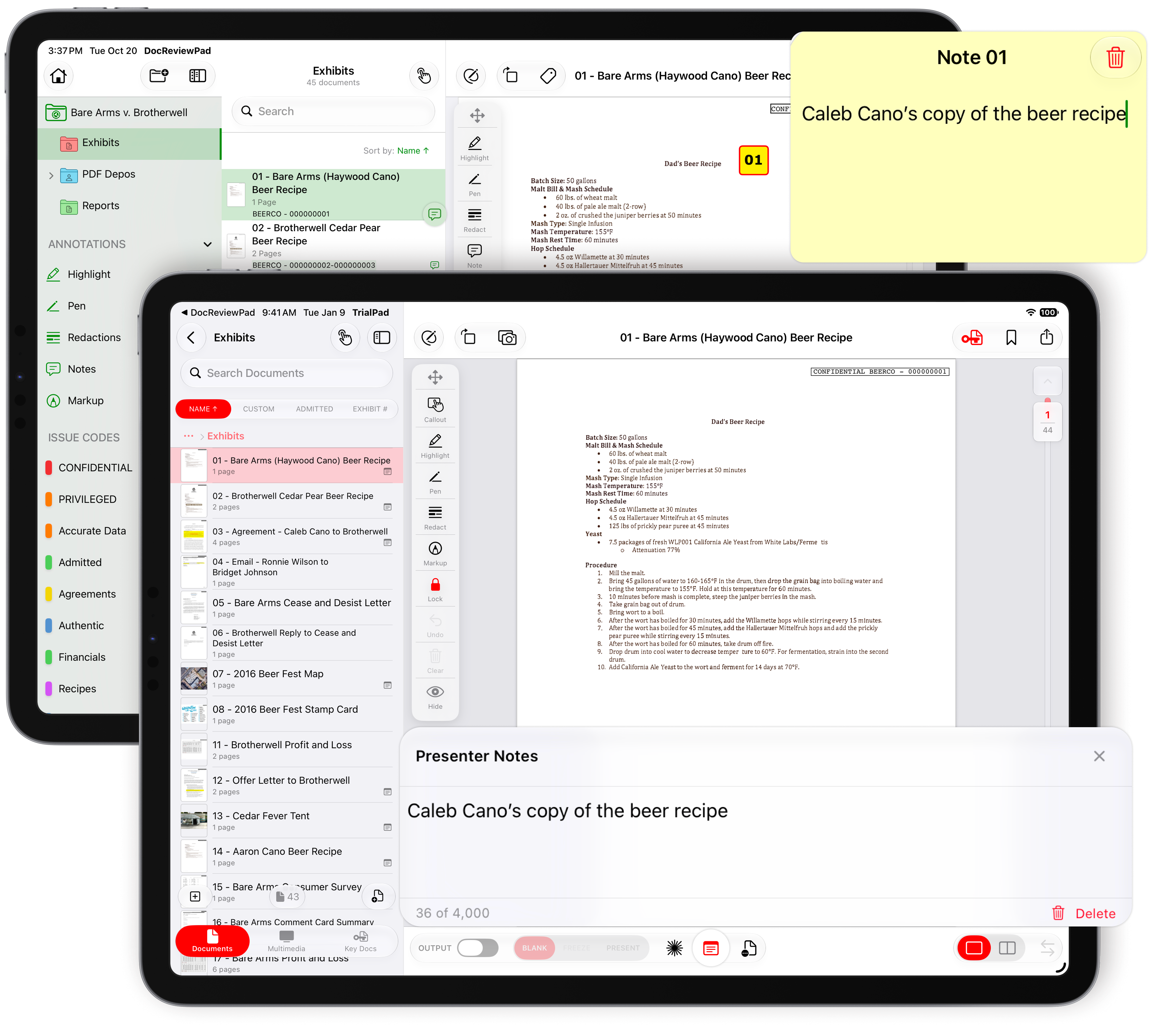
Use it when: you've flagged key passages and the critical seconds of footage during review, and you want every one of those notes waiting for you in TrialPad at the hearing.
Faster, smoother everyday review
A handful of changes add up to a review session that simply moves faster:
- The page grid. Tap the new page grid button to see every page of a document as a thumbnail, complete with its annotations and Bates numbers. Spot the marked-up pages at a glance, select just the responsive ones, and code only those.
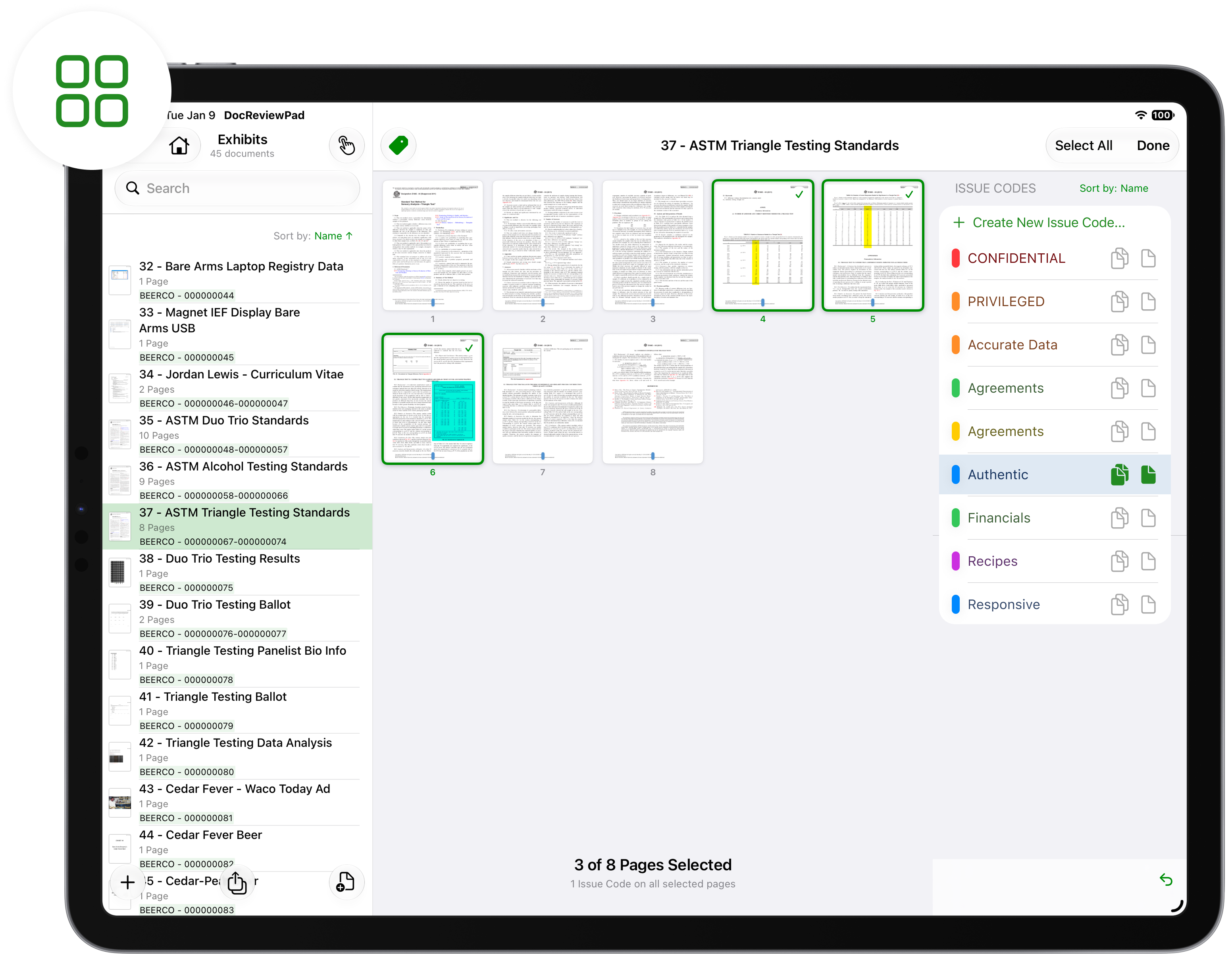
- Batch issue coding. Select several documents in the list and code them all at once. Code a 30-document batch to the same issue in one pass.
- Issue Codes, rebuilt. Modeled on Create Designations in TranscriptPad, with instant visual feedback, inline editing, and a sort order that stays the way you set it.
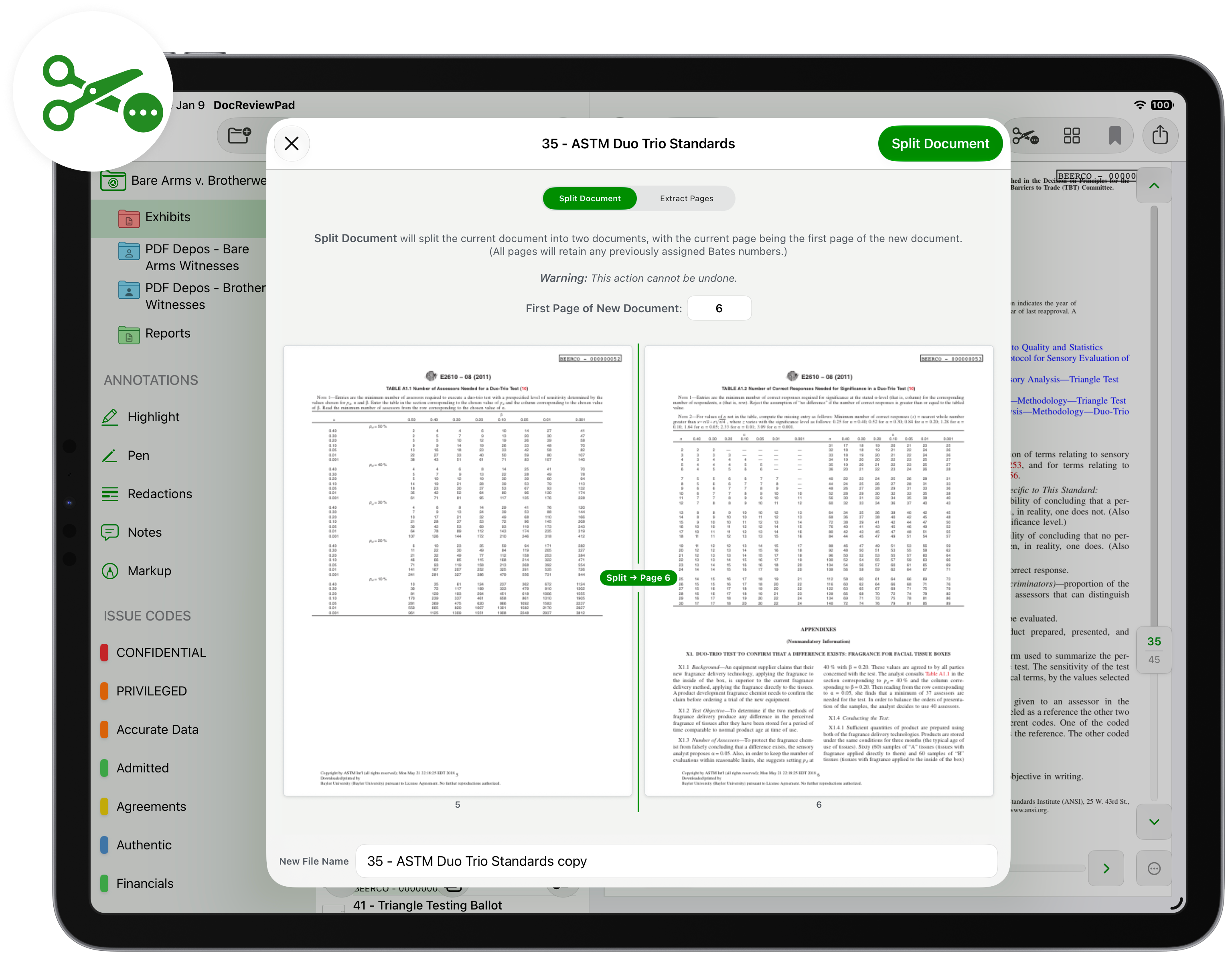
- Visual split and extract. Split Document uses a scrolling thumbnail strip that snaps to page boundaries; Extract Pages uses a grid you tap to select. Type a page number to jump on long documents. Split a 400-page transcript at the right exhibit boundary by looking at the pages, not guessing at a page count.
- Annotation tools that match TrialPad. A wider palette with labeled buttons for Highlight, Pen, Redact, Note, Markup, Lock, Undo, and Clear. Keep it floating, or anchor it to the top or side so the document resizes instead of being covered. Use your finger or stylus, or choose Apple Pencil for precision handwriting with the Markup Tool. Check out more about the Markup Tool here.
- Big imports are a breeze. A 5,000-document production comes in with a progress bar while you keep working on the files that have already arrived.
Every one of these was built the way the rest of DocReviewPad was: for a finger or an Apple Pencil, on the device you already carry. Nothing here asks you to learn a new system or budget for software that assumes you're staffing a document review room. It's the case file you already know, now able to hold more of the case, including the parts that move.
Try It Yourself
We’ve made a lot of improvements we are confident you will love. None of them require a manual to use, and that’s always been the point of DocReviewPad. Video sits right in your case file: import bodycam, dashcam, CCTV, and deposition video alongside your documents, bookmark key moments by timestamp, capture a single frame as a still exhibit, and Bates number and issue code like any other document. A new case-wide search runs OCR on scanned pages automatically, and the rebuilt Bates numbering has a live preview, tap-to-position stamps, and Ghost Bates for productions that already carry another party’s stamp. You’ll also see the new three-column workspace, the page grid for coding just the pages that matter, and DocReviewPad is now available for iPhone and iPhone Duo.
Open DocReviewPad, pull up a Case File, and spend a couple minutes with the new layout and search capabilities. The best way to know how much better your review can be is to try it for yourself.

*This is a free update for current LIT SUITE subscribers, just go to the App Store and update to the latest version! Be sure to update all devices running the LIT SUITE for continuity across your hardware platforms.
Want to see all of this in action?
Join us for our live webinar. Our team will walk through the changes and take your questions in real time.
⏰ October 29, 2026, 13:00 Eastern Time
👉Register now to save your seat: https://us02web.zoom.us/webinar/register/WN_jTJcOMkyS8moh4D44EgH7Q